
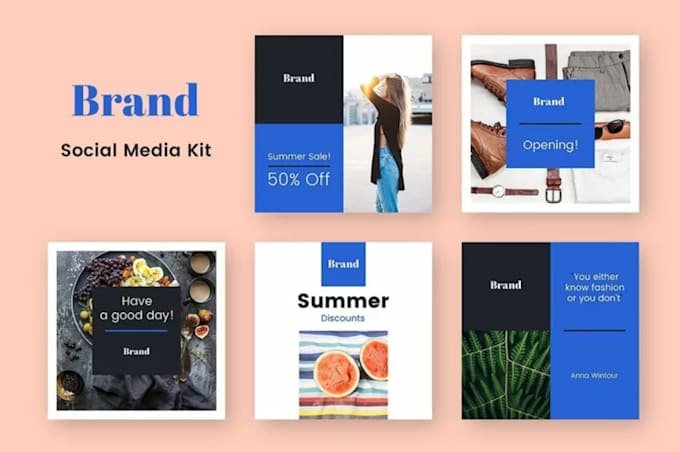
A social media brand kit guide is a centralized system containing visual assets, guidelines, templates, and messaging rules. It helps teams create consistent content without making every post look identical. A strong kit should cover logos, colors, typography, imagery, brand voice, templates, platform adaptations, and usage examples. The best approach is to define your brand identity first, create flexible template families, organize approved assets centrally, and review the system regularly. Consistency works best when fixed brand elements remain recognizable while layouts and creative treatments can adapt to different content and platforms.
Social Media Brand Kit Guide: Build Consistent Content
A strong social presence starts with a clear and recognizable visual identity. When every post looks different, audiences may struggle to remember your brand. A simple system makes content creation faster, clearer, and more professional. That system is a social media brand kit built around practical rules. It brings logos, colors, fonts, templates, imagery, and messaging into one place. Instead of designing from scratch, your team follows an established creative direction.

What Is a Social Media Brand Kit?
A social media brand kit is a collection of assets and rules. It explains how your brand should appear across different social platforms. Think of it as your team’s visual rulebook for everyday content. It helps designers, marketers, freelancers, and creators produce recognizable content. A good kit creates consistency without forcing every post to look identical.
Brand Kit vs. Brand Guidelines
Brand guidelines explain the broader rules behind your brand identity. A brand kit makes those rules easier to apply during content creation. Guidelines tell creators what is correct, while assets make execution easier. For example, guidelines may specify your official blue and preferred font. Your brand kit can then provide those exact colors, fonts, logos, and templates. If you haven’t documented your core identity rules yet, start with our brand guidelines template before building platform-specific assets.
Why Your Social Content Needs One
Consistency builds recognition because people repeatedly see familiar visual signals. It also reduces unnecessary decisions during everyday content production. Your team spends less time guessing and more time creating useful content. A centralized system can also reduce design revisions and communication problems. This becomes especially valuable when several people manage social media accounts.
What Should a Social Media Brand Kit Include?
A complete kit should contain everything creators regularly need for social content. Keep the system practical rather than filling it with unnecessary information. Every asset should help someone create better branded content faster. The following components provide a strong foundation for most businesses and creators.
| Brand Element | What to Include | Main Purpose |
|---|---|---|
| Logo | Primary, secondary, icon versions | Brand recognition |
| Colors | Primary, secondary, accent colors | Visual consistency |
| Typography | Heading and body fonts | Clear communication |
| Imagery | Photography and image treatments | Consistent visual style |
| Graphics | Icons, shapes, patterns | Brand personality |
| Voice | Tone, terminology, messaging rules | Consistent communication |
| Templates | Posts, Stories, carousels, covers | Faster content creation |
| Guidelines | Dos, don’ts, examples | Fewer mistakes |
Logo and Brand Mark Rules
Start by documenting every approved logo variation your team may need. Include horizontal, stacked, icon, light, and dark versions when appropriate. Clear instructions prevent creators from stretching, recoloring, or misplacing logos. Also specify minimum sizes, spacing, backgrounds, and unacceptable logo treatments. Store high-quality files in formats suitable for different publishing requirements.
Colors and Typography
Choose a manageable palette containing primary, secondary, and accent colors. Include exact HEX and RGB values so everyone uses identical shades. Your typography system should clearly define headings, subheadings, and body text. Avoid adding too many fonts because excessive variety weakens visual recognition. Prioritize readability, especially when text appears on small mobile screens.
Photography, Graphics, and Visual Style
Your imagery should communicate the personality you want audiences to recognize. Define preferred photography styles, lighting, composition, filters, illustrations, and graphic elements. Visual consistency becomes stronger when image choices follow simple repeatable rules. You can also specify preferred icon styles, borders, textures, and background treatments. These details make individual posts feel connected without becoming repetitive.
Brand Voice and Messaging Rules
Visual branding works best when your written communication feels equally consistent. Document your preferred tone, vocabulary, sentence style, calls to action, and messaging priorities. A recognizable voice makes captions feel connected across different social platforms. Include examples of phrases to use and language your team should avoid. Content pillars can also help creators understand which topics deserve regular attention.
How to Create a Social Media Brand Kit Step by Step
Building your kit becomes easier when you work from strategy toward execution. Begin with your existing brand identity before designing new social assets. The goal is to create a repeatable system rather than another design folder. Each stage should make content creation easier for everyone involved. Review the finished system with actual content examples before sharing it.
1. Define Your Core Brand Identity
Start by identifying your audience, positioning, personality, and brand promise. Then establish several content pillars that support your communication strategy. These foundations help designers make choices that feel strategically appropriate. Your visual identity should reflect what your audience expects from your business. This step prevents attractive designs from becoming disconnected from your actual brand.
2. Choose Your Visual Brand Elements
Select your approved colors, fonts, logos, imagery, icons, and graphic components. Keep the number of choices manageable so creators can work confidently. Too many options can make even simple social posts difficult. Decide which elements are fixed and which ones allow creative flexibility. This balance supports both brand recognition and fresh content.
3. Create Social Media Template Families
Do not create one template and force every message into it. Instead, develop template families for different content purposes and formats. Templates should support variety while maintaining recognizable visual anchors. Consider educational carousels, testimonials, announcements, promotional posts, Stories, and Reel covers. Include enough flexibility for different headlines, images, and content lengths.
4. Add Platform-Specific Rules
Your identity should remain recognizable while adapting to each platform’s environment. Instagram, TikTok, LinkedIn, Facebook, and YouTube all encourage different content behaviors. Consistent branding does not require identical designs across every platform. Document suitable dimensions, text placement, imagery, and template variations for each channel. This approach creates consistent social media design without making content feel copied.
5. Document the Rules With Examples
Written instructions become much easier to understand when people can see examples. Include correct and incorrect logo use, color combinations, typography, layouts, and imagery. Examples turn abstract brand rules into decisions creators understand immediately. Add short explanations beside important examples to clarify the reasoning. This makes onboarding new employees and freelancers significantly easier.
How to Keep Social Media Design Consistent
Creating the kit is only half the process because consistency depends on daily usage. Your team needs an easy way to find current assets and templates. A complicated system will eventually encourage people to create shortcuts. Make the approved resources accessible from one central location. Then regularly check whether published content follows the established visual identity.
Build a Single Source of Truth
Choose one location for current logos, fonts, colors, templates, guidelines, and examples. Depending on your workflow, this might be Canva, Figma, Notion, or another asset-management platform. Everyone should know exactly where the latest approved resources live. Remove outdated files or clearly mark them as archived. A centralized library reduces confusion and prevents old assets from returning to production.
Lock the Elements That Should Not Change
Some brand elements need tighter control than others. Your logo, core colors, primary fonts, and fundamental visual style should remain stable. These fixed elements create the strongest signals of brand recognition.Document them clearly and avoid unnecessary changes between campaigns. Consistency becomes easier when creators know which decisions are already made.
Allow Creative Flexibility
A strong brand system should never make every post look mechanically identical. Give creators room to experiment with layouts, photography, motion, composition, and content formats. Flexibility keeps branded content fresh while protecting recognizable visual signals. The key is deciding where experimentation is safe and where consistency matters most. This creates a design system rather than a collection of rigid templates.
Common Social Media Brand Kit Mistakes to Avoid
Many businesses create brand kits but still struggle with inconsistent content afterward. The problem is usually poor organization, excessive complexity, or unclear rules. A useful kit should remove friction instead of creating another workflow burden. Watch for these common mistakes when reviewing your system.
- Using too many colors or fonts.
- Making every post visually identical.
- Creating templates without clear hierarchy.
- Ignoring mobile readability and accessibility.
- Keeping outdated assets in the main library.
- Giving guidelines without practical examples.
- Storing approved resources across multiple locations.
- Never reviewing templates against current platform needs.
How to Maintain Your Social Media Brand Kit
Your brand kit should evolve as your business and content strategy develop. Review it periodically instead of treating it as a finished document. Regular maintenance keeps your content system useful and trustworthy. Remove retired campaign assets and replace outdated templates when necessary. A quarterly review can help identify gaps before they become production problems.
Audit Your Brand Kit Regularly
Check your logos, colors, fonts, templates, imagery, messaging, and platform requirements. Ask whether creators can find everything they need without additional explanation. A quick audit can reveal outdated assets before they affect campaigns. Review recently published content against the documented rules as well. Update examples whenever your visual identity or communication style changes.
Measure Whether Your Brand System Works
The best brand kit should improve both quality and production efficiency. Look for fewer revisions, faster creation, easier onboarding, and stronger visual recognition. Good systems make consistent content easier without slowing creative teams down. Ask team members which assets are confusing or difficult to locate. Their feedback can guide practical improvements during future updates.
Social Media Brand Kit Checklist
Before publishing your finished system, confirm that it contains essential visual, messaging, and workflow resources. A complete checklist helps identify missing pieces before your team starts using it. Keep the checklist accessible alongside your main brand assets. It can also become part of your onboarding process for new contributors.
- Logo variations and usage rules
- Primary and secondary color palettes
- Typography hierarchy
- Photography and graphic direction
- Brand voice and messaging rules
- Social media templates
- Platform-specific adaptations
- Dos and don’ts
- Central asset library
- Review and update schedule
Key Takeaway
The purpose of a brand kit is not simply visual decoration. It creates a repeatable framework that helps people produce recognizable content confidently. The best systems balance consistency, flexibility, usability, and clear communication. Start with your identity, turn it into practical rules, and build reusable templates. Then keep the system organized, accessible, and regularly updated by your team.
Conclusion
A well-built social media brand kit can transform a scattered content workflow. It gives your team clear visual rules while leaving enough room for creative expression. Consistency becomes much easier when everyone works from the same reliable system. From logos and colors to templates and messaging, every element should serve recognition. For any brandsholder, investing in this structure can create stronger, more recognizable social content over time.
FAQs
What is a social media brand kit?
It is a centralized collection of brand assets, templates, and social guidelines. It helps teams create recognizable content across different platforms. The system typically includes logos, colors, typography, imagery, templates, and voice rules.
What should a social media brand kit include?
A useful kit should include logos, brand colors, fonts, imagery rules, templates, and messaging guidelines. It should also provide examples showing correct and incorrect usage. Platform-specific rules can make the system even more practical.
What is the difference between a brand kit and brand guidelines?
Brand guidelines explain the rules governing your overall brand identity. A brand kit provides the assets and resources needed to apply those rules. In simple terms, guidelines explain what to do, while the kit helps you do it.
How many social media templates should a brand have?
There is no universal number because content needs vary between businesses. Start with templates for your most common formats and content types. Add new templates only when they solve a recurring production need.
How often should you update a social media brand kit?
Review the kit at least quarterly to identify outdated resources and missing assets. A larger review may be useful after a rebrand, campaign change, or major platform shift. Regular updates help your team maintain consistent and relevant content.
{
“@context”: “https://schema.org”,
“@type”: “FAQPage”,
“mainEntity”: [
{
“@type”: “Question”,
“name”: “What is a social media brand kit?”,
“acceptedAnswer”: {
“@type”: “Answer”,
“text”: “A social media brand kit is a centralized collection of brand assets, templates, and social guidelines. It helps teams create recognizable content across different platforms, including logos, colors, typography, imagery, templates, and voice rules.”
}
},
{
“@type”: “Question”,
“name”: “What should a social media brand kit include?”,
“acceptedAnswer”: {
“@type”: “Answer”,
“text”: “A useful kit should include logos, brand colors, fonts, imagery rules, templates, messaging guidelines, and practical examples showing correct and incorrect usage along with platform-specific rules.”
}
},
{
“@type”: “Question”,
“name”: “What is the difference between a brand kit and brand guidelines?”,
“acceptedAnswer”: {
“@type”: “Answer”,
“text”: “Brand guidelines explain the rules governing your overall brand identity, while a brand kit provides the exact assets and resources needed to apply those rules in daily content production.”
}
},
{
“@type”: “Question”,
“name”: “How many social media templates should a brand have?”,
“acceptedAnswer”: {
“@type”: “Answer”,
“text”: “There is no universal number. Start with templates for your most common content formats and types, and add new templates only when they solve a recurring production need.”
}
},
{
“@type”: “Question”,
“name”: “How often should you update a social media brand kit?”,
“acceptedAnswer”: {
“@type”: “Answer”,
“text”: “Review the kit at least quarterly to identify outdated resources and missing assets. Larger reviews should happen after a rebrand, strategic shift, or major social platform update.”
}
}
]
}