YouTube Community Posts give creators a simple way to communicate beyond traditional videos. A strong strategy combines polls, questions, images, teasers, and discussions with a consistent publishing rhythm. Posts can support audience research, video promotion, engagement, and stronger viewer relationships. The most effective creators use audience feedback to improve future content rather than chasing unnecessary posting volume.
Most creators focus heavily on videos while overlooking what happens between uploads. That gap can make subscribers forget about a channel surprisingly quickly. A smart youtube community posts strategy keeps conversations active without requiring another full video. It gives creators a simple way to share ideas, ask questions, collect feedback, and build stronger relationships with viewers.
What Are YouTube Community Posts?
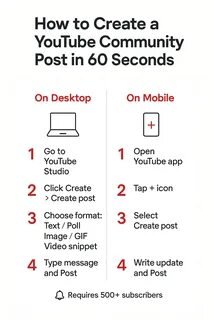
YouTube Community Posts are lightweight updates designed for audience interaction. Creators can use text, images, polls, quizzes, GIFs, music, and videos to communicate with subscribers. These posts give viewers more ways to interact beyond watching uploaded content. They can appear across different parts of YouTube, helping creators stay visible between videos.
How YouTube Posts Work
Posts can serve different purposes depending on your channel and audience. A poll can collect opinions, while an image can provide behind-the-scenes context. A question can start a conversation around your latest upload or upcoming topic. The key is choosing a format that matches the action you want viewers to take.
Community Tab vs. YouTube Posts vs. Communities
YouTube’s terminology has evolved, which can confuse newer creators. The former Community Tab is now generally referred to through YouTube’s Posts functionality. YouTube also has Communities, which provide a more discussion-focused space for subscribers and creators. Understanding these differences helps creators choose the right feature for each communication goal.
Why Community Posts Matter for YouTube Growth
A channel does not have to communicate only when another video goes live. Community Posts create small touchpoints that keep viewers connected with the creator. They can support audience research, discussion, promotion, and relationship building without demanding major production time. That makes them a useful youtube engagement feature for growing channels.
Stay Connected Between Video Uploads
Long gaps between uploads can reduce the sense of connection with viewers. A simple update can remind subscribers that the channel remains active. You might share a progress update, ask a question, or reveal something coming next. These small interactions can make your audience feel included rather than forgotten.
Turn Viewers Into Participants
Watching a video is mostly a passive experience for many subscribers. Posts give viewers an easy opportunity to express opinions and influence conversations. When people see their responses acknowledged, they have more reason to participate again. Over time, repeated interaction can turn casual viewers into active community members.
Learn What Your Audience Actually Wants
Guessing your next topic can waste valuable creative energy and time. Polls provide a quick way to understand audience interests before creating another video. Questions can also reveal problems, preferences, objections, and ideas that analytics cannot explain. This turns your audience into a useful source of real content research.
The YouTube Community Posts Strategy That Actually Works
An effective strategy begins with purpose instead of simply posting more frequently. Every update should support your content, audience, or broader channel objective. The strongest approach connects Posts with videos while giving followers something useful between uploads. This creates a content ecosystem rather than another repetitive publishing task.
Build Posts Around Your Video Content
Your Posts should naturally extend the conversations started by your videos. Before publishing, you could share a teaser or ask viewers what they expect. After publishing, ask a specific question related to the video’s most interesting point. Between uploads, continue that discussion with additional insights, examples, or audience responses.
Use Different Post Types for Different Goals
Different formats work better for different communication objectives and audience behaviors. Instead of repeating one format, rotate them according to your content needs. This keeps your feed more varied while helping you discover what your audience prefers. A simple content mix can make your youtube community posts strategy more effective.
| Post Type | Best Purpose |
|---|---|
| Poll | Collect opinions and preferences |
| Question | Start meaningful conversations |
| Image | Show personality or behind-the-scenes moments |
| Teaser | Build anticipation for upcoming content |
| Video Share | Support discovery of relevant content |
| Quiz | Encourage quick audience participation |
| Update | Keep subscribers informed |
Create a Repeatable Posting Schedule
Consistency matters more than publishing a large number of Posts. A practical schedule could include one pre-video update and one follow-up discussion. Add another post between uploads when you have something genuinely useful to share. This approach keeps your audience engaged without turning community management into a daily burden.
How to Grow YouTube With Community Posts
Posts can support channel growth when they are connected to meaningful content and conversations. They should not be treated as a shortcut for weak videos or poor audience retention. Instead, use them to strengthen the relationship surrounding your main content. That is how creators can realistically grow YouTube with Community Posts.
Use Polls to Generate Content Ideas
Polls can help you identify subjects your audience actually wants covered. Ask about upcoming topics, preferred formats, common problems, or content priorities. Then use those responses to shape future videos where appropriate. When viewers see their feedback influencing content, participation can become more meaningful.
Revive Older Videos
Older videos can still provide value when their topics remain relevant. Create a Post around an interesting point from an evergreen upload. Explain why the topic matters today and invite viewers to share their experience. This approach can give useful older content another opportunity to reach interested subscribers.
Build Anticipation for New Videos
A strong launch can begin before the video itself becomes available. Share a relevant question, image, teaser, or surprising fact beforehand. Avoid revealing everything because curiosity gives viewers a reason to return. The goal is to create anticipation rather than simply announce another upload.
Make Viewers Feel Seen
People respond differently when they feel their opinions genuinely matter. Mention useful audience suggestions when they influence your future content decisions. Respond thoughtfully to questions instead of treating every interaction as another metric. This human approach can strengthen trust and make subscribers feel part of something.
Community Post Ideas for Different YouTube Channels
There is no universal Post format because different audiences behave differently. A gaming audience may enjoy quick polls, while an educational audience may prefer useful questions. Creators should adapt Posts around the interests and expectations already established through their videos. Relevance will usually matter more than copying another channel’s posting routine.
Educational Channels
Educational creators can use quizzes, questions, polls, and topic requests. Ask viewers which concept they find most confusing before preparing a detailed explanation. You can also test misconceptions and use responses to improve future lessons. These interactions turn audience questions into valuable content opportunities.
Entertainment Channels
Entertainment channels can make Posts more personality-driven and conversational. Behind-the-scenes images, opinions, predictions, challenges, and teasers can work naturally here. The goal is to make followers feel closer to the creator. That connection can encourage viewers to return even when no new video exists.
Business and Personal Brand Channels
Brands and professionals can use Posts to understand customer interests and communicate updates. Ask followers about product preferences, industry questions, or challenges they currently face. Share useful insights rather than turning every update into a sales message. This keeps the audience relationship informative and credible.
Common YouTube Community Posts Mistakes
Many creators use Posts but fail to give them a clear purpose. Random updates can quickly become background noise for subscribers. Others make every post promotional, which can reduce genuine interaction over time. Avoiding these mistakes makes your content feel more intentional and audience-focused.
Posting Without a Purpose
Before publishing, decide what you want the audience to do. The goal could be conversation, feedback, discovery, promotion, or relationship building. A clear purpose makes it easier to choose the appropriate format. It also gives you a better way to judge whether the post worked.
Promoting Every Video
Constantly telling people to watch another video can feel repetitive. Instead, create context around why that video deserves their attention. Ask a question connected to its topic or highlight one useful takeaway. Promotion becomes more natural when the Post provides value first.
Ignoring Comments
Posting a question and disappearing sends the wrong message. If viewers invest time answering, acknowledge useful responses whenever possible. Active conversations make the feature feel like a community rather than another broadcasting channel. Your participation can also encourage other viewers to join.
Posting Too Much Low-Value Content
More Posts do not automatically create stronger audience relationships. Publishing frequent updates without useful information can overwhelm followers. Focus on relevance, personality, curiosity, or genuine value instead. A smaller number of thoughtful Posts can support a healthier content ecosystem.
How to Measure Your Community Posts Strategy
Measurement helps you understand which conversations deserve more attention. Look beyond simple impressions and identify the formats that generate meaningful responses. Compare different post types over several publishing cycles rather than judging one update. This creates a clearer picture of what your audience actually enjoys.
Track Engagement
Monitor reactions, comments, poll participation, and other available performance indicators. Look for patterns instead of focusing on one unusually successful post. A post with fewer interactions may still provide valuable audience insights. Measurement should help improve decisions rather than encourage vanity-metric chasing.
Identify Your Best Formats
Compare polls, questions, images, teasers, and other formats regularly. Notice which subjects generate stronger conversations and repeated participation. Then create more content around those successful patterns without becoming repetitive. Your audience’s behavior should gradually shape your posting strategy.
Turn Performance Data Into Better Posts
Use a simple improvement cycle after each content experiment. Publish something useful, measure the response, identify what worked, and adjust. Over time, this process creates a more informed content strategy. The goal is continuous learning rather than finding one perfect formula.
YouTube Beyond Videos: Building a Loyal Audience
YouTube growth is not only about publishing more videos consistently. Strong channels also create reasons for subscribers to participate between major uploads. Posts can become the conversation layer surrounding your main content. This is the broader idea behind youtube beyond videos.
From Subscribers to Active Participants
A subscriber becomes more valuable when they regularly interact with your content. Posts provide simple opportunities for people to answer questions, vote, react, and share opinions. These small actions create familiarity between the audience and creator. Over time, participation can become a stronger community habit.
Let Your Audience Influence the Channel
Your audience can provide ideas that improve future content decisions. Use polls and questions to understand what viewers need or want next. Not every suggestion needs to become a video, but useful patterns deserve attention. When audiences feel heard, the relationship becomes more collaborative.
Key Takeaway
Community Posts work best when they support a larger content strategy. They can maintain conversations, collect feedback, promote relevant content, and strengthen audience relationships. The winning approach is not posting constantly but giving viewers meaningful reasons to participate. Treat Posts as a bridge between videos, not as filler content.
Conclusion
YouTube Community Posts are often overlooked because they require less production than traditional videos. Yet that simplicity is exactly what makes them valuable for maintaining regular audience conversations. A thoughtful strategy can turn polls, questions, updates, and discussions into meaningful community-building opportunities. For creators and brands, Brandsholder can use this broader approach to think beyond publishing videos and focus on building lasting audience relationships.
Frequently Asked Questions
What are YouTube Community Posts?
YouTube Community Posts are updates that help creators interact with viewers. They can include formats such as polls, images, text, quizzes, GIFs, music, and videos. Creators can use them to start conversations and share information between uploads.
How often should I use YouTube Community Posts?
There is no single posting frequency that works for every channel. Start with a sustainable schedule that you can maintain consistently. One or two thoughtful Posts around your regular video schedule can provide a practical starting point.
Do Community Posts help grow a YouTube channel?
Posts can support engagement, audience research, content discovery, and viewer relationships. However, they should complement strong videos rather than replace them. Their greatest value comes from keeping your audience connected with your channel.
What should I post on the YouTube Community Tab?
Try polls, questions, behind-the-scenes images, video teasers, quizzes, updates, and relevant older-video recommendations. Choose formats based on what your audience already enjoys discussing. Avoid making every update a direct promotion.
Are Community Posts better than YouTube videos?
Posts and videos serve different purposes, so neither is universally better. Videos provide deeper content, while Posts create lightweight opportunities for ongoing interaction. Using both together creates a stronger and more complete audience experience.