Google Search Console vs Google Analytics 4 serve completely different purposes for website owners. Search Console provides key metrics like keyword rankings, impressions, clicks, indexing insights, and technical SEO health. On the flipped side, GA4 focuses extensively on user behavior, post-click engagement, conversions, and revenue tracking. For sustainable organic growth, Search Console must be your primary source for evaluating real search visibility data. However, for conversion analysis and overall business growth, GA4 remains absolutely essential. The most successful optimization strategies always combine both tools to connect organic rankings directly with real business outcomes.
Website owners frequently debate the merits of google search console vs analytics when trying to improve their organic search performance. Both of these free platforms come straight from Google, yet they track and measure entirely different aspects of a modern digital presence. One focuses specifically on how human users discover your site through search result pages, while the other explains exactly what those visitors do after they land on your pages. Understanding this separation helps digital marketers make smarter technical decisions and avoid relying on confusing data points.
Understanding the Purpose of Each Tool
Google built these platforms to solve distinct digital measurement challenges. Many business owners incorrectly assume they provide overlapping data. In reality, they answer entirely independent questions regarding your organic performance and visitor tracking.
What Google Search Console Measures
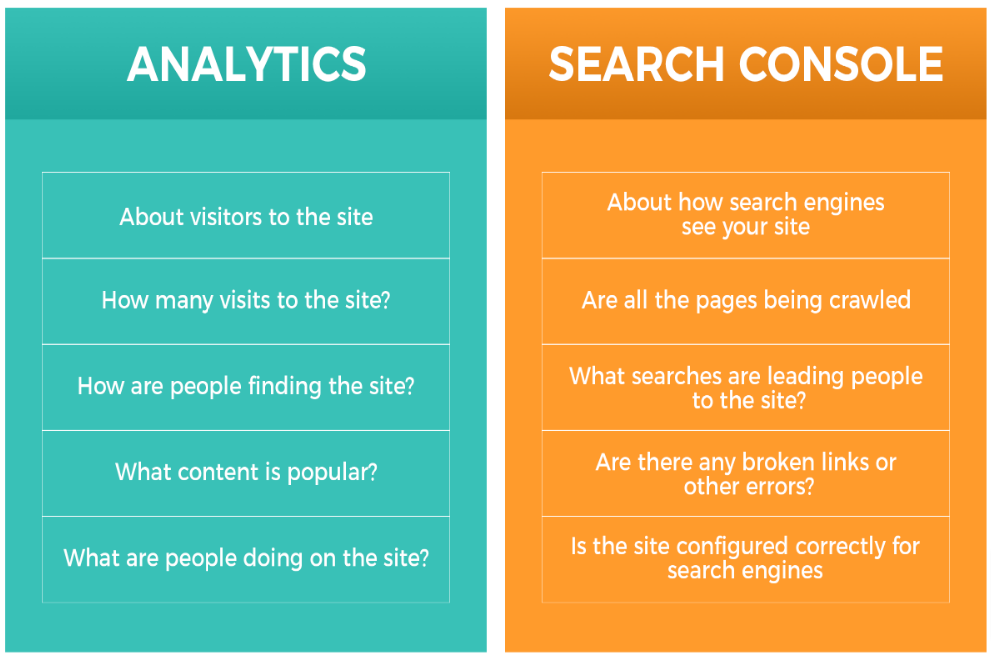
Google Search Console focuses strictly on your website’s technical relationship with the Google Search index. It displays search impressions, organic clicks, exact keyword rankings, URL indexing status, and direct crawl error reports. These direct insights help webmasters identify how search engine algorithms view their content infrastructure. SEO professionals depend heavily on this technical data to manage visibility daily.
What Google Analytics 4 Measures
Google Analytics 4 tracks comprehensive visitor behavior patterns after users enter your website layout. It records active sessions, user engagement rates, custom events, goals, conversions, and various traffic acquisition sources. The upgraded platform helps marketers break down real customer journeys and audience actions. Critical business expansion plans often rely heavily on these deep behavioral insights.
Why Their Numbers Never Match
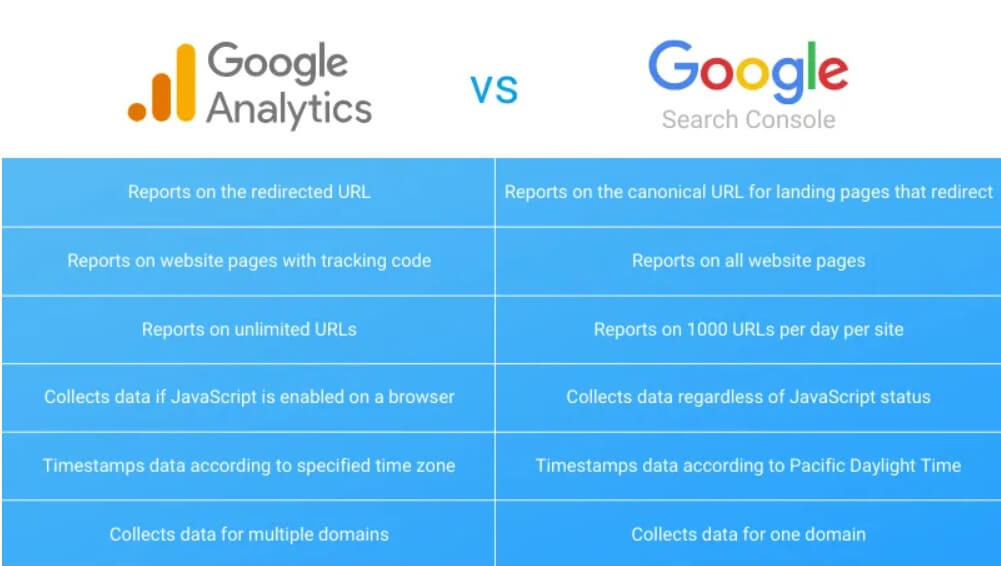
Many users worry when Search Console and GA4 display differing traffic numbers. This discrepancy occurs because both tools track separate actions. Search Console records raw search engine result page interactions, while Analytics monitors active on-site JavaScript behavior. These distinct data collection styles naturally generate entirely separate datasets.
Google Search Console vs Analytics : The Core Differences
The main distinction lies within the precise type of data collected by each platform. Search Console details pre-click search performance, while GA4 documents post-click user interaction. Recognizing this operational boundary prevents reporting confusion and enhances your seasonal strategy analysis.
Data Collection Methods
Search Console gathers its internal data directly from Google’s active search ecosystem logs. Conversely, GA4 uses tracking tags and tracking scripts installed manually on your server or web layout. Both tools assemble information completely independent of one another, explaining why final dashboards rarely mirror each other.
Search Engine Data vs User Behavior Data
Search Console answers how human readers discovered your brand website in search results. Analytics covers what those readers did once they arrived at your destination. One highlights hidden visibility opportunities, whereas the other showcases clear business performance metrics. Together, they form a highly cohesive digital marketing workflow.
Reporting Delays and Accuracy
Search Console reports regularly experience a slight operational delay of two to three days. GA4 often updates significantly faster depending on your custom data stream configurations. Neither system is wrong when their numbers display notable variation; they simply illustrate different stages of a standard consumer journey.
| Feature | Google Search Console | Google Analytics 4 |
|---|---|---|
| Keyword Data | Yes | Limited |
| User Behavior | No | Yes |
| Conversions | No | Yes |
| Indexing Reports | Yes | No |
| Organic Visibility | Yes | Partial |
| Revenue Tracking | No | Yes |
GSC vs GA4 Differences That Impact SEO
Many marketers mistakenly look at basic traffic numbers alone when evaluating health. However, long-term optimization depends on diving into the explicit gsc vs ga4 differences that dictate modern rankings. Certain core metrics influence search engine algorithms far more directly than others.
Keyword Performance Tracking
Search Console stands alone as the finest repository for keyword performance analytics. It uncovers accurate organic impressions, clicks, average positions, and localized click-through rates. GA4 cannot provide this granular keyword insight because of privacy masking. Organic campaigns rely heavily on these transparent search query insights to fix zero-impression bugs. Once you’ve pulled this keyword data, the next step is comparing it against competing domains, a structured SEO competitor gap analysis often reveals ranking opportunities that raw Search Console numbers alone won’t show.
Click-Through Rate Analysis
Click-through rate remains one of the absolute best indicators of content relevance. A webpage ranking on page one but pulling minimal clicks indicates an optimization gap. Search Console makes isolating these low-performing URLs simple. Small click-through rate adjustments often yield incredible traffic shifts across your entire blog footprint. Beyond rewriting titles and meta descriptions, pages already sitting near the top can pull in extra clicks by targeting position zero, winning a featured snippet often pushes a listing above the standard blue links entirely.”
Ranking Position Monitoring
Monitoring search positions allows teams to gauge real-world SEO progress accurately. Search Console offers reliable average ranking positions across millions of distinct long-tail phrases. This dashboard reveals if your hard work is actively moving the needle. GA4 completely lacks direct keyword position tracking capabilities.
Landing Page Performance
Both systems provide valuable landing page evaluation perspectives. Search Console reveals overall query visibility and immediate marketplace demand. Analytics evaluates user retention quality and conversion health after that organic traffic lands. Blending these matching viewpoints helps you craft infinitely stronger content updates.
Which SEO Tool Better Supports Organic Growth?
The perfect answer hinges entirely upon your immediate campaign objectives. Driving organic growth requires maximizing external visibility and inner user engagement concurrently. Overlooking either part of the equation creates a fragmented strategy that risks losing impressions during algorithm core updates.
When studying advanced search engine guidelines, it becomes obvious that choosing which seo tool better satisfies your workflow requires balancing technical health against conversion monitoring. Technical teams prefer raw diagnostics, while performance marketers want transaction logs.
When Search Console Should Be Your Priority
Search Console demands focus during early keyword research cycles and structural ranking assessments. It isolates critical coverage blocks and uncovers fresh keyword opportunities. Initial organic boosts start with data discovered in Search Console reports. Optimization specialists check these diagnostic summaries regularly to keep indexing clean.
When Analytics Should Be Your Priority
Analytics takes center stage when measuring actual business outcomes and lead generation. Top rankings mean nothing if traffic bounces away instantly. Active user engagement, event conversions, and total revenue define business health. GA4 bridges the massive gap between search visibility and measurable profits.
Why Most Successful SEO Teams Use Both
Top-tier marketing teams never limit themselves to just one tracking platform. They blend keyword intelligence matrices with deep on-site behavioral metrics. This balanced strategy offers a clear overview of customer acquisition pipelines. Better business decisions happen naturally when both tools work in perfect harmony.
Search Console Data Guide : Metrics That Actually Matter
Not every dashboard statistic requires your daily attention. Some particular reports directly alter content optimization plans, while others offer light context rather than real actionable intelligence. Using a structured search console data guide helps your marketing team prioritize high-impact metrics over vanity data.
Impressions
Impressions show exactly how often your target URLs appear inside search results. Growing impressions generally hint at rising contextual relevance across search engines. However, impressions by themselves do not pay the bills. They must be aggressively paired with click improvements and solid landing page structures to drive value.
Clicks
Clicks show the real human visitors originating directly from organic listings. This specific metric mirrors how well your titles pull interest from a crowd of competing sites. Strong growth in clicks proves your metadata updates are working beautifully. Most brand performance reviews start and end with click numbers.
Average Position
Average position shows your accurate placement path over a fixed timeframe. Moving up from position twelve to position six changes your business trajectory. Even minor jumps in search rank cause exponential growth in potential impressions. Tracking position trends keeps your core content highly prioritized.
CTR
CTR links your search visibility directly with your metadata’s natural click appeal. High ranks matched with poor CTR indicate an immediate title optimization issue. Refreshing descriptions and clear headings regularly solves this gap. This KPI demands constant monitoring to capture hidden search traffic.
Daily Search Health Framework:
Inspect fresh indexing errors and coverage alerts.
Isolate unexpected search ranking drops on core assets.
Monitor click-through rate shifts across primary landers.
Audit absolute organic click volume weekly.
Analytics vs Console SEO Reporting
Data reporting becomes highly lucrative when linked to definite company milestones. Too many companies waste time tracking vanity numbers. Strategic reporting concentrates heavily on profitable actions that align with the latest search engine guidelines.
Mastering analytics vs console seo processes empowers brands to accurately value their search traffic. By matching search queries with behavioral metrics, you ensure your writing matches what real users want to find.
Measuring Traffic Quality
Traffic volume matters significantly less than actual traffic quality. GA4 allows webmasters to audit user engagement rates and session lengths. Search Console cannot provide this contextual backdrop. High-quality targeted traffic regularly outperforms unoptimized mass volume.
Measuring Engagement
User engagement reveals whether content satisfies visitor expectations. Metrics like engaged sessions provide valuable behavioral signals. These insights guide content improvements effectively. Better engagement often supports stronger business results.
Measuring Business Outcomes
Conversions represent the ultimate measure of website success. Analytics tracks purchases, leads, subscriptions, and custom events. Search Console cannot measure these outcomes directly. Revenue-focused organizations depend heavily on GA4 reporting.
Connecting Rankings to Revenue
The most advanced SEO strategies connect search performance with revenue. Search Console identifies opportunities for growth. Analytics validates whether those opportunities generate business value. This combination creates smarter optimization priorities.
The Most Important Reports for SEO Professionals
Not every sub-menu deserves your limited analysis time. Certain standard reports consistently highlight fast ranking opportunities. These reports should form the core of your weekly digital checkups.
Best Search Console Reports
The Performance Report uncovers hidden keyword patterns very quickly. The Indexing Report highlights broken URLs and crawl blockages before they hurt views. Page Experience data helps teams evaluate mobile usability issues. Together, these clean toolsets build a solid foundation for continuous search growth.
Best GA4 Reports
Traffic Acquisition Reports show where your active visitors originate with total clarity. Landing Page Reports display precise content performance values. Engagement Reports expose where readers drop off your layout. Conversion Reports track your accurate lead distribution and financial returns.
Which Data Actually Matters Most?
The right focus depends entirely on your exact corporate milestones. Search engine visibility and operational business health require distinct data treatments. Selecting vital metrics matters far more than gathering endless screenshots.
Metrics That Influence Rankings
Prioritize tracking impressions, clicks, keyword click-through rates, and error-free indexing. These technical metrics tell you if your site complies with modern search rules. Search Console remains your primary hub for these indicators. True organic expansion always starts with technical compliance.
Metrics That Influence Revenue
User engagement, event conversions, and multi-channel customer journeys dictate real revenue numbers. These specific parameters help brands optimize their digital marketing investments. Analytics yields the necessary clarity required to track these events. Long-term sales growth relies completely on these post-click behaviors.
Metrics Most Marketers Overvalue
Raw unsegmented traffic numbers receive way too much attention in old-school reports. Huge visitor numbers mean absolutely nothing without high engagement rates or completed transactions. Expert modern marketers favor clear business outcomes over generic volume numbers every single time.
| Goal | Best Tool |
| Keyword Rankings | Search Console |
| Technical SEO | Search Console |
| Organic Visibility | Search Console |
| User Behavior | GA4 |
| Conversions | GA4 |
| Revenue Analysis | GA4 |
Key Takeaways
- Search Console explains how users find your website.
- GA4 explains what users do after arriving.
- Keyword rankings and CTR matter for SEO growth.
- Conversions and engagement matter for business growth.
- The strongest SEO strategy combines both platforms.
Final Verdict on Google Search Console vs Analytics
For dedicated SEO professionals, Search Console stands as the absolute foundational tool. It grants zero-cost access to ranking, indexation, and query performance files. Without this framework, your technical optimization strategy becomes pure guesswork.
For traditional digital marketers, GA4 wins by explaining deep customer actions and operational conversions. It helps teams evaluate content depth, campaign ROI, and e-commerce transactions. These items form the backbone of scalable marketing initiatives.
Ultimately, the smartest path does not require choosing between them. Success happens when you link pre-click search metrics with post-click consumer tracking. As the digital strategists at Brandsholder frequently explain, true online transformation occurs when keyword visibility, engagement rates, and revenue conversions are analyzed as one unified picture.
Frequently Asked Questions
1. Is Google Search Console better than Google Analytics?
Neither system is better than the other overall. Search Console is superior for organic query research and technical health, whereas GA4 is built for user behavior profiling and conversion tracking.
2. Why is Search Console traffic different from GA4?
Both platforms collect data via different methodologies. Search Console monitors raw search result clicks directly on Google, while GA4 records physical sessions using JavaScript tracking tags on your site pages.
3. Can Search Console replace Analytics?
No, it cannot. Search Console entirely lacks user behavioral tracking, conversion goal setup, and automated e-commerce revenue reporting features that modern brands require.
4. Which tool is better for keyword tracking?
Google Search Console is the premium native option for auditing real keyword rankings, total search impressions, exact clicks, and ongoing click-through rates.
5. What SEO metrics should I monitor regularly?
You should build a dashboard tracking impressions, organic clicks, average positions, indexation health errors, user engagement rates, and final goal conversions on a rolling weekly schedule.